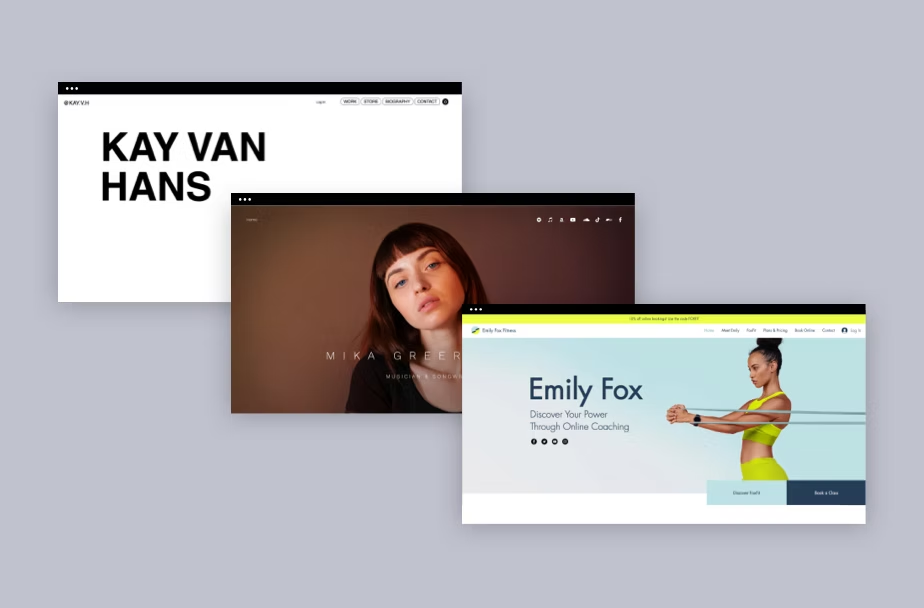
In 2026, your personal website isn’t just an optional portfolio, it’s a must-have digital identity. Unlike social media, where algorithms change daily and platforms can disappear overnight, a website is a space you own and control. According to Forbes, over 70% of small businesses have a website, and individuals are following the same trend to stand out. A personal website is often the first impression employers, collaborators, or potential clients get when they Google your name.
Here’s why:
- Hiring managers check online presence. Research shows 70% of employers screen candidates through the internet before making hiring decisions. If they don’t find a polished site, you risk being overlooked.
- Design drives credibility. Studies reveal that first impressions online are 94% design-related meaning layout, visuals, and professionalism matter even before your words are read.
- Content builds trust. Having a digital space where you showcase your projects, values, and expertise helps establish authority in your field.
In short: if you want to control your narrative, build authority, and unlock opportunities, your personal website is your most powerful asset.
This post explains why a personal website is important, how to make one even if you’ve never coded, what to put on it, and the real benefits. Career, networking, trust, and even alternative income streams. You’ll get practical steps and examples so you can go live this week.
How Do I Make a Website If I’ve Never Done It Before?
Creating a personal website is easier than ever, no coding required. Website builders like Wix, Squarespace, and WordPress offer drag-and-drop solutions that let beginners launch in days, not months.
Steps to get started:
Choose a Platform
- WordPress → Flexible, scalable, widely used.
- Wix → Beginner-friendly with templates.
- Squarespace → Sleek, modern designs ideal for portfolios.
- Carrd → Perfect for simple one-page profiles.
Pick a Domain Name
- Use your full name if available (e.g., janesmith.com).
- If not, add a keyword like “design,” “writer,” or “portfolio.”
Select a Clean Template
- Prioritize mobile-friendly layouts.
- Avoid clutter. Simplicity signals professionalism.
Create Essential Pages
- Home: Snapshot of who you are.
- About: Your story, mission, and background.
- Portfolio/Work: Projects, case studies, and results.
- Contact: A form or clear email/social links.
Pro tip: Don’t wait until you have a perfect site. Launch a basic one-page website first. It’s better to be online with something simple than invisible with nothing at all.
Create Your Information Hub
Your personal website should serve as your central hub. Yhe place where people find everything about you in one click.
Why it matters:
- Centralized credibility: Instead of sending people to 4 different platforms, your website collects your resume, portfolio, and achievements in one place.
- Permanent ownership: Social media posts vanish or get buried; your website ensures important work stays visible.
- One-click access: Recruiters or clients shouldn’t need to scroll LinkedIn feeds, your hub saves them time.
What to include in your hub:
- Portfolio samples (case studies, images, or videos).
- Resume or CV (downloadable PDF).
- Social media links (LinkedIn, YouTube, Twitter/X).
- A contact form or direct email.
- Blog or resource section (optional, but builds authority).
Key point: owning a canonical source reduces friction for people who want to understand your work or contact you.
Define The Purpose of Your Site
A personal website isn’t “one size fits all.” You must define its purpose before you start.
Common purposes include:
- Career growth → showcase projects to land jobs.
- Freelancing → attract leads with service pages and testimonials.
- Thought leadership → share blog posts and grow an audience.
- Creative showcase → portfolios for designers, writers, photographers.
Pro tip: Write a one-sentence mission statement for your site. Example: “This website helps potential clients quickly understand my design process and contact me for freelance projects.” Design the homepage to answer visitors’ questions in three seconds, who you are, what you do, and how to contact you.
Open to All
A personal website is inclusive anyone can have one. Students, side-hustlers, creatives, consultants, corporate employees: a site helps all of them establish a professional digital footprint. In many fields (design, writing, engineering), a portfolio site demonstrates competence better than a CV alone.
- Students → Build credibility before graduation by showcasing projects.
- Freelancers → Get discovered beyond marketplaces like Upwork or Fiverr.
- Corporate employees → Stand out for promotions or side projects.
- Entrepreneurs → Build trust with investors and partners.
Think of your website as your digital handshake accessible, universal, and lasting. Because platforms evolve, your website is a stable asset you control. Social platforms change algorithms and policies; a website stays yours, can be backed up, and can be moved between hosts. That stability is especially valuable for long-term career building.
Personal Brand
Your personal website is the easiest way to package your personal brand voice, values, and the problems you solve. Your website is your personal brand headquarters. Unlike LinkedIn, you control how your story is told.
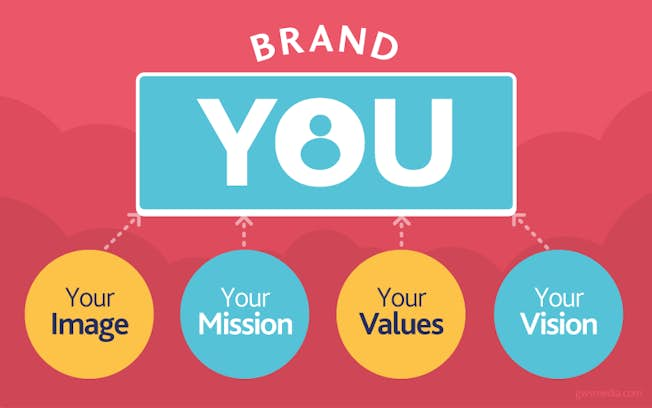
Elements to include:
- Headline: One line describing what you do.
- About me: A short bio with career highlights.
- Portfolio/Work samples: Real proof of your skills.
- Testimonials: Quotes from clients, mentors, or colleagues.
- CTA (Call to Action): “Hire me,” “Work with me,” or “Let’s collaborate.”
Bonus tip: Use your own color palette, logo, and tone of voice to stay memorable. A coherent brand reduces friction when people decide whether to hire, collaborate, or follow you.
Build Your Network
Networking works better when you give people a professional place to land.

- Easy referrals: Instead of sending multiple links, share yourname.com.
- SEO visibility: Your site can rank for your name + niche.
- Newsletter signup: Start capturing emails for long-term relationships.
- Collaboration showcase: Highlight past partnerships to attract more.
Pro tip: Add a lead magnet (like a free PDF or template) to your site. This encourages visitors to leave their email, turning them into contacts.
Building a mailing list from your site gives you a direct channel to people who care about your work far more valuable than platform followers who can vanish with changing algorithms.
Stand Out From the Rest
Many candidates and freelancers look similar on LinkedIn; a personal website lets you differentiate with format and storytelling. Use case studies (not just a list of tasks) to explain the problem, your process, and measurable outcomes. Visuals, screenshots, micro videos, slide decks make your work tangible.
Ways to stand out:
- Use case studies (problem → your solution → measurable results).
- Add visuals (videos, screenshots, infographics).
- Keep your design simple but polished. Speed and clarity matter.

Example: Instead of saying “I do social media marketing,” write:
“I grew a client’s Instagram following by 45% in 6 months through strategy, content batching, and influencer partnerships.”
Create a Professional Impression
Studies show that design shapes first impressions. Poor design can cost trust before someone reads your copy. A clean, mobile-friendly layout and a high-quality headshot communicate competence.
Elements that create trust:
- Fast load time & mobile responsiveness.
- A high-quality headshot.
- Professional bio with credibility markers (years of experience, certifications).
- Clear navigation, avoid too many tabs.
- Updated content (a blog last updated in 2019 signals neglect).
Pro tip: Add a simple contact button on every page. Make it easy for people to reach you.
UX tip: People decide in about three seconds whether to stay. Make your value obvious right away.
Generate Alternative Income
Your website is also a platform for monetization beyond sponsorships. A personal website can become a passive income stream.
Options include:
- Freelance services: Offer coaching, writing, design, or consulting.
- Affiliate marketing: Recommend tools you use and earn commissions.
- Courses / memberships: Create gated content for paid subscribers.
- Sell digital products — eBooks, templates, or design assets.
- Direct client work — clearly listed services and a booking form reduce friction.
- Paid newsletters or memberships — host premium content behind a paywall.
Even if you’re not famous, your site can quietly generate income if you solve problems with content. Because you control the funnel, you capture more value per visitor than on social networks where monetization often requires high follower counts.
Do Next-Level Networking

Think of your website as your personal networking assistant. Use your site to accelerate higher-quality networking:
- Create a “Work with me” or “Collaborate” page that clearly spells out the types of projects you accept and the expected process.
- Add a short “press kit” or downloadable one-pager with headshots and bios for events and podcasts.
- Publish short, searchable notes after events (e.g., “Takeaways from ProductCon 2025”. This positions you as an active thinker and makes outreach easier.
In short: This positions you as someone who’s ready for opportunities rather than waiting passively.
Conclusion: It’s Time to Go Live
Owning a personal website is owning your professional future. In a world where social channels shift quickly and first impressions are mostly visual, your website is a durable place to showcase your work, tell your story, and build relationships that convert into jobs, clients, and collaborations. With most small businesses already online and recruiters checking candidates, a simple, well-designed site can be the difference between being found and being passed over.
You don’t need to be famous to deserve a professional corner of the web. Your name is a brand, and your website is the flagship.
Ready to go live?
If you want a no-fluff setup, we’ll help you launch a polished personal site in one weekend. Complete with domain setup, mobile-friendly design, and a starter SEO checklist.
Book a free 15-minute site strategy call and let’s put your name on the map.
FAQs
Why should you have a personal website?
It centralizes your portfolio, increases credibility, and makes you discoverable to employers and clients.
Should everyone have a website?
Yes. Any professional who wants control over their online story benefits from one.
What is the 3-second rule in web design?
Visitors should be able to understand who you are and what you do within three seconds of landing on your homepage.
What are the 7 C’s of a website?
Clear, Concise, Compelling, Consistent, Credible, Clean (design), and Converted (has a CTA).
Will a website replace social media?
No. Use social channels for distribution and your website as the permanent, owned home for content.
How much does a basic website cost?
You can launch a simple site for <$50/year (domain + basic hosting) using templates; costs grow with customization.
How long does it take to build a decent site?
A basic, good-looking personal site can be built in a weekend with a site builder; polishing and content will take weeks.
Does a personal site help job search?
Yes. Many recruiters search candidates online; a well-crafted site increases interview chances.