
Want to save 5 – 10 hours every week without hiring help? In 2026, the answer isn’t more hustle, it’s smarter AI prompts.
According to McKinsey, businesses using AI saw a 40% boost in productivity and slashed repetitive tasks by 60%. These aren’t hypotheticals. I’ve used the exact prompts below to run marketing, content, and admin, all without burnout.
Let’s dive into 10 AI prompts that work for real businesses.
What Are AI Prompts for Business?
AI prompts are carefully crafted instructions you give to AI tools like ChatGPT, Claude, or Google Gemini to generate specific, useful outputs. Think of them as the starting point for automating anything, emails, planning, analysis, content, or customer interactions.
Unlike vague or open-ended questions, strong AI prompts help you get actionable, business-ready results. The more targeted your prompt, the more relevant and time-saving the outcome.
Why AI Prompts Matter
In 2026, top AI tools are no longer novelties, they’re must-haves. But it’s not just about using AI; it’s about knowing how to ask AI the right way.
Whether you’re drafting client emails, analyzing expenses, or planning your weekly priorities, great prompts can:
- Save hours of manual work
- Improve quality and consistency
- Reduce decision fatigue
- Help you scale with fewer resources
Why Most AI Prompts Fail (And How to Fix Them)
The most common mistakes people make with AI prompts:
- Being too vague: e.g., “Write me a blog”
- Not providing context: e.g., “Make this better”
- Overloading the prompt: e.g., 5 different tasks at once
Fix: Break tasks into parts, provide structure, and be specific about format, length, and tone. Use formatting cues like bullets or numbered steps. The goal is clarity, not complexity.
How to Write AI Prompts That Get Results
A great AI prompt often follows this structure:
Action + Context + Details + Constraints
For example:
“Write a follow-up email to a client about project delay. Include apology, revised timeline, and offer a call. Keep the tone polite, under 150 words.”
Bonus Tip: Save your best prompts in a swipe file or template doc. This becomes your personal AI assistant toolkit!
10 AI Power Prompts That Will Change Your Business
These time-saving prompts are my secret to cutting down on tasks and focusing on what truly matters. Let’s break them down with real use cases.
1. Email Response Generator
Prompt:
“Draft a professional response. Include: key point acknowledgment, next steps, and a deadline. Keep it under 7 sentences..”
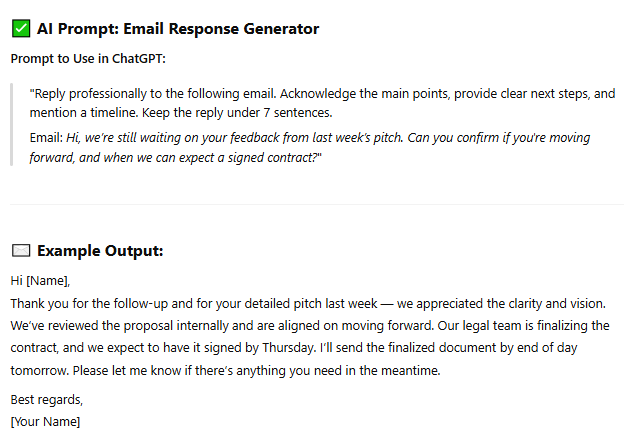
Why It Works:
- Saves 8–10 minutes per email
- Ensures tone consistency
- Ideal for clients, vendors and internal teams
You can tweak the tone: “Make it sound empathetic but assertive.”
2. Meeting Prep Shortcut
Prompt:
“Create a briefing: 3 key points, 2 potential objections with counterpoints, 3 strategic questions.”
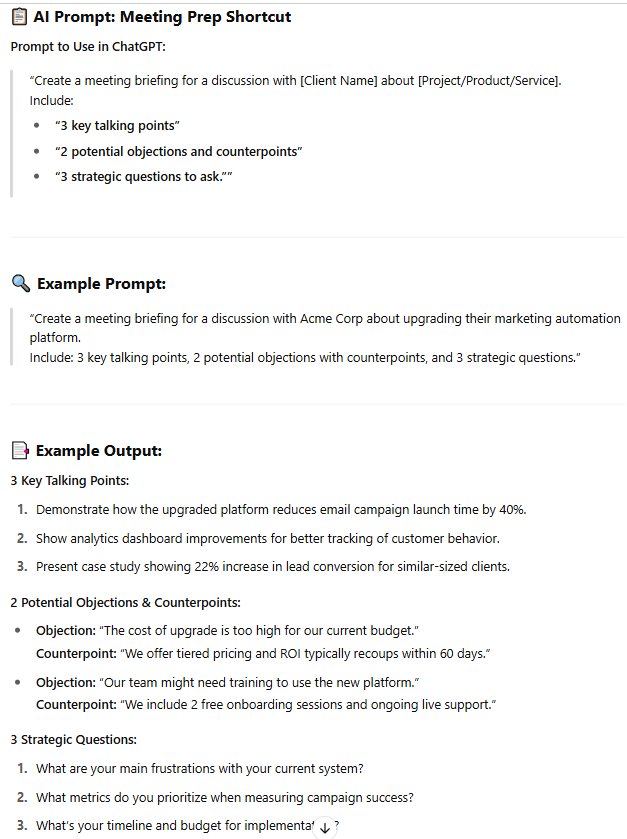
Why It Works:
- Turns 30 minutes of prep into 3
- Boosts confidence in high-stakes meetings
- Ideal for pitches, negotiations, or client calls
Add: “Keep it concise, under 200 words” to make it a quick pre-meeting glance.
3. Follow-Up Message Creator
Prompt:
“Draft follow-up about [topic]. Include: key points recap, next steps, specific request with deadline.”
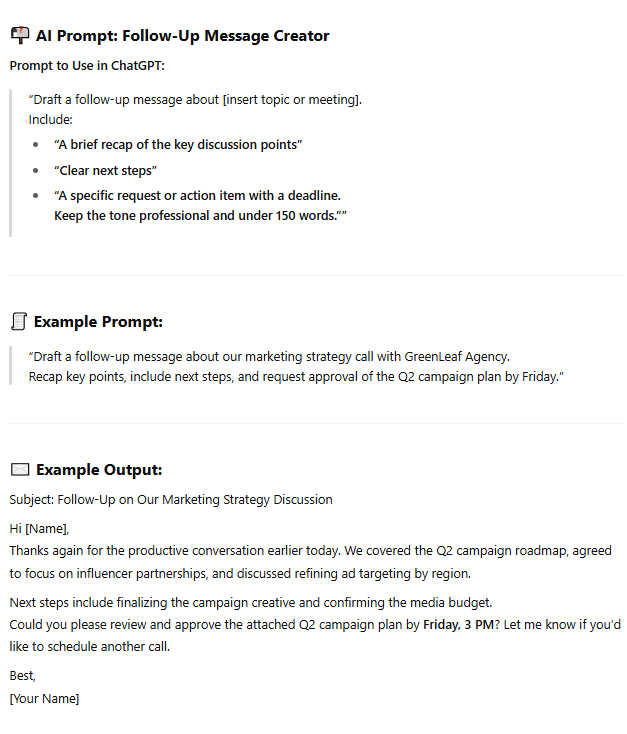
Why It Works:
- No more overthinking follow-ups
- Response rates increased by 40%
- Perfect for project check-ins or sales leads
Add urgency: “Include a soft deadline to reply by Friday.”
4. Content Repurposer
Prompt:
“Transform this blog post into 5 LinkedIn posts. Include: strong hooks, 1 key insight each, and an engaging question at the end.”
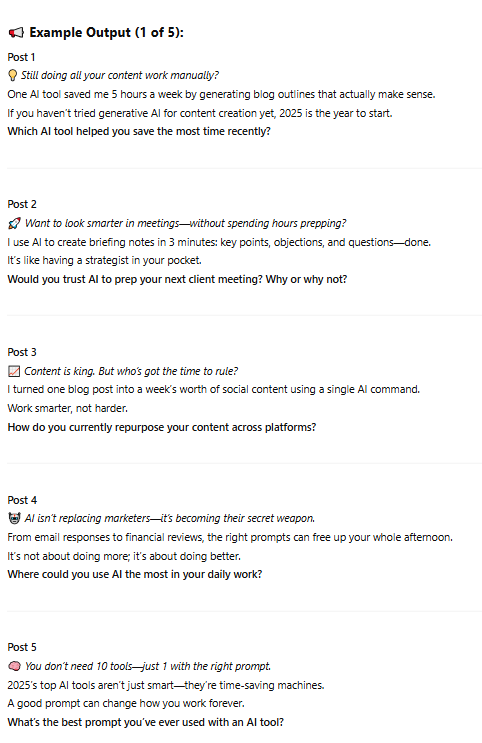
Why It Works:
- One longform becomes a week of posts
- Saves 3+ hours of content planning
- Keeps social presence active without extra effort
Ask for keyword-optimized captions for better reach.
5. Social Media Helper
Prompt:
“Create a week of social media content for [platform] based on this topic: [insert topic]. Include 5 post captions with emojis, 3 hashtag options per post, and one CTA each. Tone: [professional/friendly/witty]. Keep posts under 150 words.”
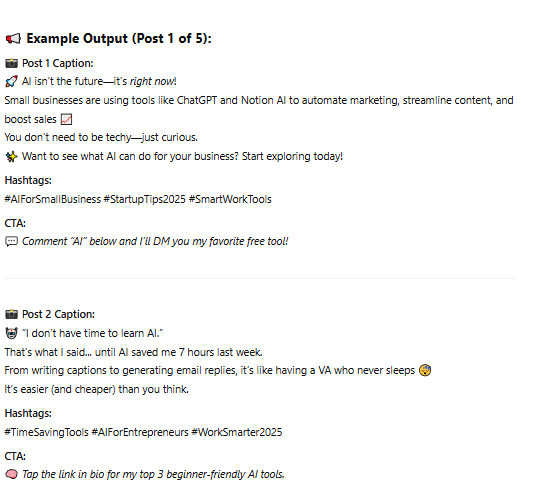
Why It Works:
- Saves 2–3 hours of content planning and brainstorming
- Keeps your feed consistent and engaging
- Great for Instagram, LinkedIn, Facebook, or X (Twitter)
Use it to batch content for an entire month with minimal tweaks.
Pro Tip: Batch-create 30 days of content using this prompt and upload to a scheduler like Buffer or Later. You’ll never scramble for content again.
6. Expense Analyzer
Prompt:
“Analyze expenses from [month]. Identify unusual patterns, budget exceeders, and saving opportunities. Present in bullet points.”
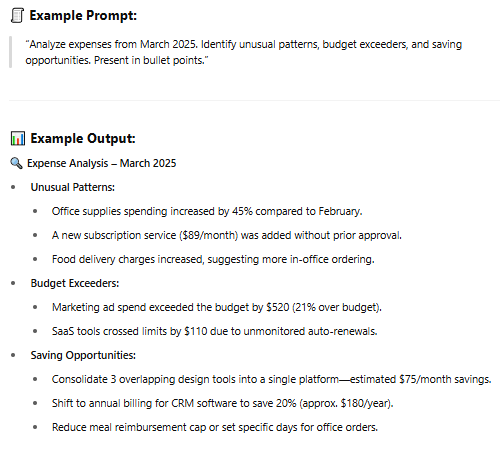
Why It Works:
- Cuts down hours of manual spreadsheet analysis
- Makes budget conversations more data-driven
- Helps identify overlooked waste and plan savings proactively
Ask for visual summaries like pie charts.
7. Customer Feedback Summariser
Prompt:
“Summarize customer feedback: top themes, requested improvements, unexpected use cases, key action items.”
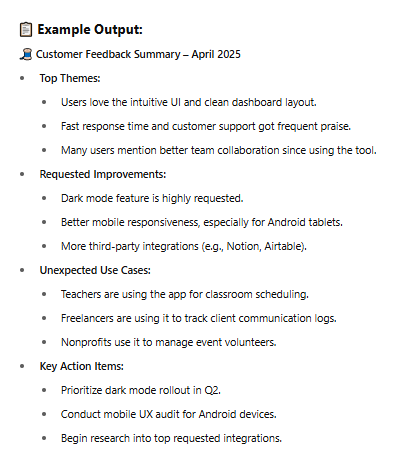
Why It Works:
- Cuts 3+ hours of feedback sorting into 2 minutes
- Surfaces clear priorities backed by real user input
- Identifies hidden value in how customers use your product
Use this after NPS surveys or testimonial rounds.
8. Process Creator
Prompt:
“Create a step-by-step SOP for [task]. Include tools, timing, dependencies, and checkpoints for quality.”
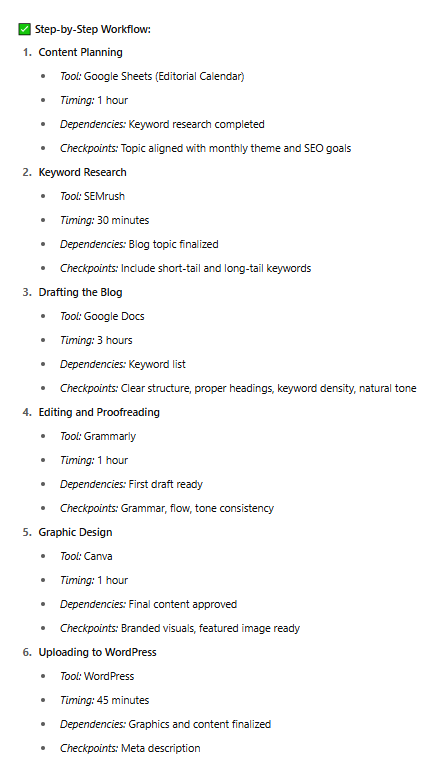
Why It Works:
- Helps new hires ramp up faster
- Documents your “secret sauce”
- Cuts onboarding and delegation time in half
Reuse the format for client deliverables or repeatable services.
9. Research Briefer
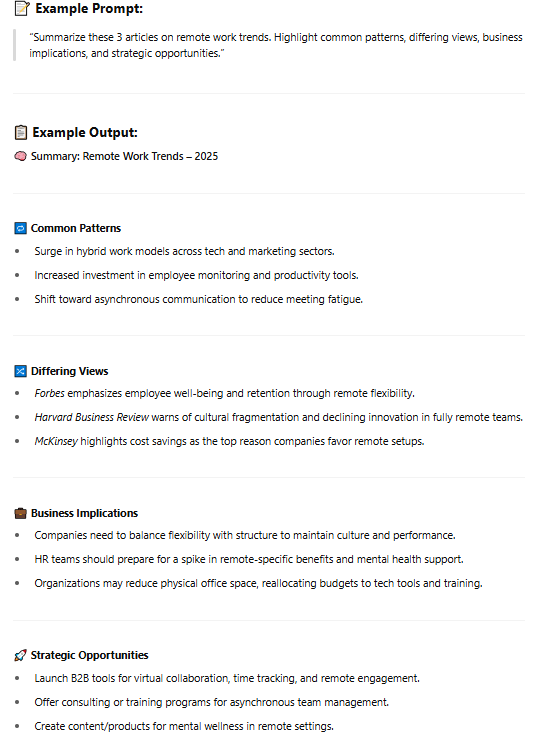
Prompt:
“Summarize these 3 articles. Highlight common patterns, differing views, business implications, and strategic opportunities.”
Why It Works:
- Condenses hours of reading into 5 minutes
- Offers fast insights for decision-making or team briefings
- Ideal for staying ahead in your niche
Paste links or article text to get summaries in seconds.
10. Weekly Planning Assistant
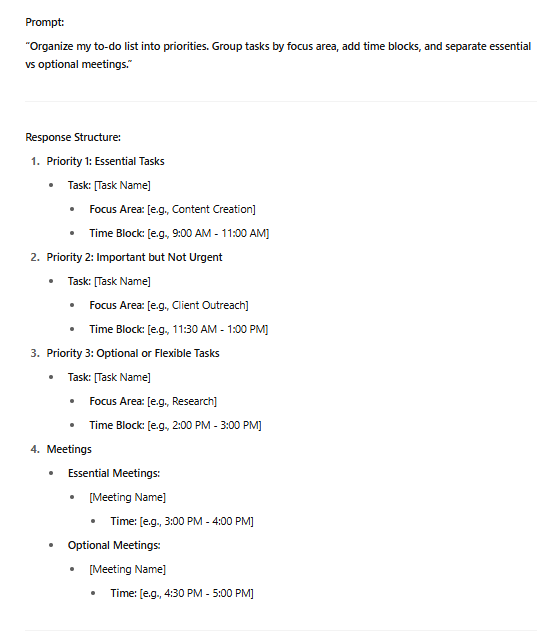
Prompt:
“Organize my to-do list into priorities. Group tasks by focus area. Add time blocks, and separate essential vs optional meetings.”
Why It Works:
- Brings clarity to chaotic weeks
- Prevents burnout from overload
- Encourages deep work and reflection
Ask for a printable schedule or synced calendar version for extra automation.
Pro Tips for Effective AI Prompting
- Be specific about tone and format
- Use placeholders: “[client name]”, “[this week’s goals]”
- Ask for improvements: “Make it more concise” or “Add a compelling hook”
- Save and reuse winning prompts
Final Thoughts: Making AI Work for You
We’re entering an era where AI prompts aren’t just tools, they’re force multipliers. Whether you’re a startup founder juggling tasks or a freelancer aiming to deliver more in less time, these AI prompts in 2026 help you reclaim hours of your week without sacrificing quality.
Don’t wait for the “perfect moment” to start. The sooner you implement these quick prompts in 2026, the faster you’ll experience their benefits. Start with just three from the list above, track your time saved, and scale from there.
Got your AI prompt idea now?
Great! Put it to work. Your future self will thank you for automating smart and focusing on what matters most.
FAQs
What is an AI prompt?
A prompt is a command or question you give an AI to generate a result like writing, summarizing, analyzing, or brainstorming.
Can anyone write good prompts?
Yes. Use clear structure: Action + Context + Format + Tone. Practice makes perfect.
Which AI tools support prompts?
ChatGPT, Claude, Gemini, Jasper, Copy.ai, Poe, and Notion AI.
Can prompts help with SEO and content?
Absolutely. They can generate optimized blog outlines, meta tags, and social captions.
How often should I use AI prompts?
Daily! For emails, planning, research, content, and admin. Think of AI as your digital assistant.